 Brick & Mortar
How It's Made · Step 24 of 27
Vibe coding Blender - scripting LEGO models, cameras and review boards
vibe-codingblendermodelsclaudeprocess
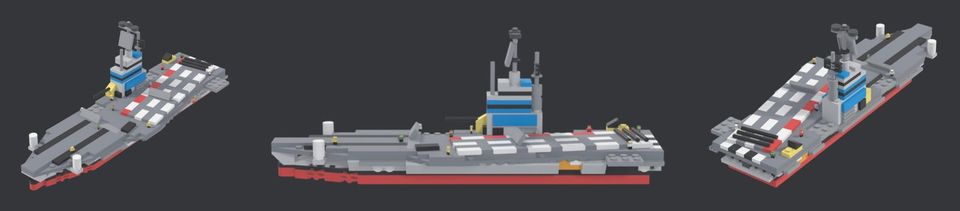
You do not need to know Blender's interface to use Blender with Claude. You need to know that Blender is a Python program with a window on it. Anything the window does can be done by a script, and a script is exactly what Claude is good at writing. Every one of the game's roughly 113 models (tanks, ships, aircraft, buildings, soldiers) is made that way. This step is how, and where it goes wrong.
The shape of the pipeline
A LEGO model is a list of parts, each with a position and a rotation. That is data. So:
scripts/ldraw.pyloads parts from the open LDraw library (about 24,700 of them) and fixes what Blender does not like: winding order, expensive round primitives, faces hidden between touching bricks.scripts/lego_kit.pyis a small grid API: put a brick at a stud position, stack a plate, build a wall, add a slope. A model script reads like a build manual.scripts/lego_models2.pyholds the models. It has grown to almost 25,000 lines. Blender runs it with no window and writes one FBX per model, plusrigs.jsonsaying where the turret pivots and where the muzzle is.
blender -b -P scripts/blender_ldraw.py -- --no-export --only Carrier --review out/afterBecause the model is code, a fix is one edit and a rebuild, and the change shows up in a diff. A model made by hand in the window is a file nobody can review.
The loop that actually works
The first version of a model is rarely right. The loop we settled on:
- The owner gives a reference: a photo of a real build, or a concept image.
- Claude writes the first script and renders three fixed views in a neutral light (front-left, side, rear-right).
scripts/refmatch.pyrenders our model from the reference's viewpoint, and lays the two side by side and overlapped at 50 per cent. A small solver tries camera angles and keeps the one whose silhouette overlaps best (intersection over union on masks).- Claude reads the overlay and writes down what is wrong: this slope is the wrong piece, that wing is two studs short.
- It fixes the script and goes round again. Only a board that passes Claude's own look goes to the owner. The owner gives the verdict and we do not iterate past it.
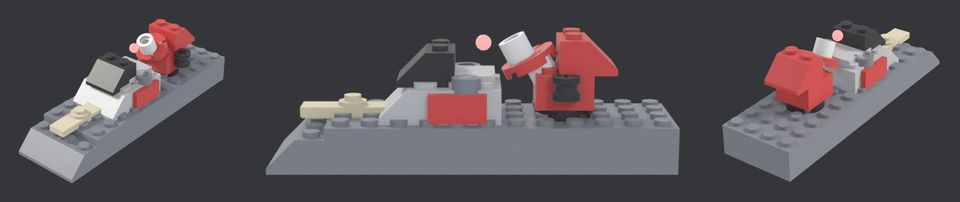
Part of this is a tool that helps Claude find parts. refmatch.py parts renders a contact sheet of every LDraw part whose name matches some words, with its part number, so Claude picks a curved slope by looking at it instead of recalling a number from memory (it is not reliable at that).
Cameras are data too
The same habit applies to cameras. A trailer shot is a list of keyframes: position in map cells, height, yaw, pitch, field of view, focus distance. A script writes them, the game flies the curve, and the recorder steps exactly 1/60 s per frame. Claude can change a camera by editing a text file. It cannot judge whether the shot is good. That is still your eyes (see Filming the real game).
What failed
None of it deep, all of it instructive.
- The sunk turrets. The icon renderer placed every part at the hull's origin, but turret vertices are stored relative to the turret's own pivot. Every cameo showed a turret buried in the hull. In the game it was always fine. We had two code paths that should have been one; we re-rendered all 46 cameos and made them share the game's path.
- Frozen arms. The little soldiers exported mid-gesture, so arms looked bolted on. Fix: export at rest and let the game pose them.
- Mesh and rig data drifting apart.
rigs.jsonis written by the same script as the mesh, yet they disagreed. The audit scriptrig_audit.py(about 355 lines, no editor needed) checked all 113 models in one pass and found 20 flags: 12 tread, 2 wheel, 4 turret and 2 muzzle problems, with zero bounds or animation problems. Each came with the measured numbers. - Claude's confidence about parts. It will describe a brick it cannot place. The overlay is how we caught it.
What to ask for
- Ask for a script, never "a model". Insist the script prints sizes in studs so a scale error is a number.
- Ask for a comparison picture and a number (overlay, overlap score) instead of "does it look right?".
- Keep one source of truth per model. Wherever two files describe one thing, add an audit.
- Fix the light and the camera for review. Two models under two lights prove nothing.
Try it yourself
Take any small object, write the Blender script that builds it from a few primitives, and run it headless (blender -b -P yourscript.py). Then add one function that renders three views to a single image. You now have a review board and Claude has something to look at. Everything else in this step is that, repeated 113 times.
Next: Vibe coding Unreal Engine 5 in C++ without a team (27 October 2026)
Related steps
How to vibe code a real game with Claude
One person, Claude and 2,240 commits in five weeks. The ten habits that kept a vibe-coded game from falling apart, with the numbers and the scars behind each one.
Vibe coding Unreal Engine 5 in C++ without a team
The build, test and capture loop that lets one person and Claude work on 120,000 lines of Unreal C++ - the scripts, the headless test runs, the launch flags and what breaks.

What vibe coding gets wrong, and how we caught it
The honest failure list from five weeks of directing Claude - invented "done", an 8,280-line line-ending commit, overwritten files, stale notes and determinism bugs - and the check that caught each.
Written afterwards from our project notes and commit history; dated to when the work happened.