 Brick & Mortar
How It's Made · Step 2 of 27
Scripting LEGO in Blender, part one - the brick kit
blenderlegopipeline
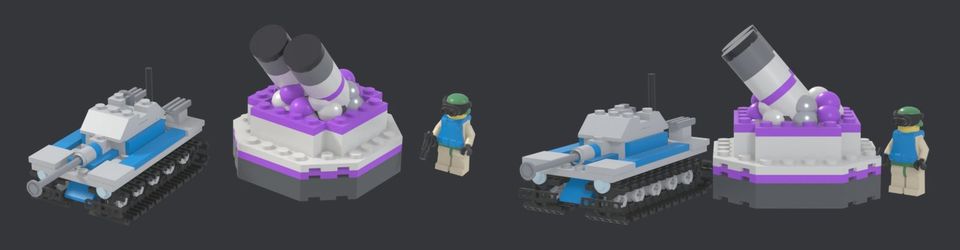
Every unit and building in Brick & Mortar is built from LEGO-style bricks. Nobody sat in a 3D program placing them. This step is about the script that does it, which we wrote on 17 September and spent most of the 18th fixing.
The idea
A LEGO model is a list of parts, each with a position and a rotation. That is a data structure. If Claude can write the list, Blender can build the model, and the same list can be exported for Unreal Engine.
We needed three things:
- A parts library. The open LDraw library has about 24,700 parts under a CC-BY 2.0 licence. We keep it outside the repository and credit it in the game.
- A loader.
scripts/ldraw.pyreads LDraw files, follows sub-part references, fixes winding order (so faces do not render inside out), swaps expensive round primitives for cheaper ones, and culls faces nobody can ever see between two bricks that touch. - A kit.
scripts/lego_kit.pyis a grid API: place a brick at a stud position, stack a plate, build a wall, add a slope. A model script reads like a build manual.
The model scripts live in one file, scripts/lego_models2.py (it has grown to nearly 25,000 lines by the time we are writing this). Blender runs them headless and writes one FBX per model, plus a rigs.json that tells the game where the turret pivots, where the muzzle is, which parts spin.
What Claude did, what the owner did
Claude wrote the loader, the kit and the first set of models. The owner supplied photos of existing LEGO builds by hobbyists and their own concept images, and judged every result by eye. That split held for the whole project: the AI proposes a model, the human gives the verdict, and we do not iterate past what the human judged.
For anything that is going to be shot to pieces we added a trick on day one. Blender records every piece it places. A k-means clustering step groups those pieces into 4 to 23 chunks per model, and the game spawns the chunks as wreckage when the model dies. A building does not vanish; it falls into the bricks it was made of.
The bugs of day two
None of these were deep. All of them were embarrassing.
The headless tanks. Every unit's menu icon (we call them cameos) was rendered by a script that placed each part at the hull's origin. Turret vertices are stored relative to the turret's own pivot, so every cameo showed the turret sunk inside the hull and the barrel hanging off the front corner. In the game itself the turrets were always fine. We re-rendered all 46 cameos once the cause was clear.
Frozen arms. Our little brick people exported in a half-raised pose, so the arm ball sat turned out of its socket and looked bolted on. The fix was to export all of them at rest and let the game pose the arms.
Ore as bricks. We had yellow pyramids for ore. The owner asked for something better, such as gold-tinted LEGO piles. Five variants built from real parts replaced them that evening, and that small change did more for the look of the map than any shader.
Reviewing a model
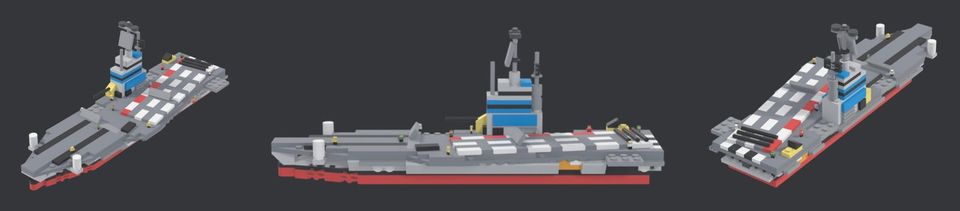
A model is not done when the script runs. It is done when a human says so. We built a review sheet: the reference on one side, three views of our build on the other. Claude looks at the crops itself first, and the owner sees only the ones that pass.
blender -b -P scripts/blender_ldraw.py -- --no-export --only Id --review Docs/review_renders/after
python scripts/model_review.py Id
What we would do differently
- Render icons and renders from the same data path as the game. We had two paths, and they disagreed.
- Put every model's size in studs in the log, so a scale error shows up as a number and not only to the eye.
- Ask for the verdict earlier. A model that looks fine to the script can still look wrong to a person in one second.
Try it yourself
Treat your 3D assets as code. A model that is a script can be rebuilt, reviewed in a diff, and fixed in one place. The first hour is slower. The second week is much faster.
Next: Making the ground real - why only the LEGO is stylised (19 September 2026)
Related steps

The model review loop
How we check LEGO models against reference photos with a script, and how a rig-audit script found 20 rigging mistakes in 113 models in one pass.
Vibe coding Blender
Every unit in the game is a Python script that places LEGO parts in Blender. How we drive it with Claude, how a model is checked against a reference, and what failed.
Day one - an empty machine, a spec and 8,000 uncompiled lines
How the project actually started - what was on the PC, what we installed, what Claude wrote before the engine existed, and what broke.
Written afterwards from our project notes and commit history; dated to when the work happened.